

An orthodontic lab may need to finish a study model set for tomorrow’s consultation while preparing a multi-stage model order for a later production run. Both orders use the same equipment and may compete for the same finishing time. What matters to the clinic is when its complete order will be ready. What matters to the lab is how many complete orders it can deliver with the equipment and technicians it has.
PioNext Ultra supports batch model printing. To plan 3D printing for orthodontic model production, start with the model types and due dates the lab receives. Then measure how the orders move through preparation, printing, and post-processing. That gives a lab manager a basis for comparing layouts, staffing the bench, and quoting jobs with different delivery requirements.
Define What the Lab Needs to Deliver
An arch model represents one maxillary or mandibular arch. A study model set may consist of both arches from one visit for case review or records. A working model supports a specified bench or appliance fabrication task. Before preparing a working model, identify the surfaces and features that the next process needs. For an appliance fabrication order, confirm the model design and material requirements of that process before grouping it with other jobs.
Define completeness at the order level. A paired study model set is ready when both requested arch models are finished and matched to the visit. A multi-stage model order is ready when every arch model due in that release is finished and labeled with its case, arch, and stage. Two orders may have the same model count and very different sorting and release requirements, especially when a clinic requests delivery in installments.
Before releasing an order, match the finished models to the case and stage list and check that the surfaces required for the next task are intact. On a study model, that might mean checking that the areas the clinician wants to review are present and undamaged. For a working model, use the requirements of the specified bench or fabrication task. These checks define what the lab can count as usable output.
Understand Single-Case and Multi-Stage Model Orders
A single-case order may require only a few models by a specific date. Waiting for a full batch can delay that order, so balance platform utilization with each case's delivery deadline.
Count the requested arch models before laying out print jobs. A 10-stage sequence with upper and lower arch models at each stage requires 20 arch models. If the clinic requests only the early stages for the first delivery, allocate those models to the first release and plan the remaining models against their own due date.
Keep single-model requests and expected reprints in the production forecast. Order demand is the number of usable models the clinic needs, while production demand includes the additional attempts the lab expects to make.
Keep case, arch, and stage identifiers readable through printing and post-processing. The technician should be able to sort similar-looking models without relying on memory.
Match PioNext Ultra and the Model Material to the Workload
PioNext Ultra's 211.68 × 118.37 × 100 mm build volume provides space for arranging several arch models in one job. The number that fits depends on their dimensions, orientation, bases, and supports. Use representative files to establish the layout for the laboratory's own orders.
LCD printing exposes a layer across the arranged parts. Adding models of similar height in their print orientations can increase the number of arch models in a build without multiplying the layer count by the number of models. Actual job duration still depends on the material profile, layout, and layer cycle. Evaluate the prepared batch rather than multiplying a single-model print time by the number of models.
Our PioNext Ultra resin parameter reference includes Ortho Model 2.0 Resin at a 0.1 mm layer thickness. Our dental resin range also describes Ortho Model Resin and Ortho Model 2.0 Resin and their intended uses. Select the material and profile that match the model type and any subsequent processing requirements.
PioNext Ultra's temperature-controlled chamber has a specified range of 25–35 °C. When comparing repeated model batches, keep the selected material profile and processing conditions consistent so the result reflects the workload being assessed.
PioNext BOX handles the layout and slicing. Group jobs by the resin and supported process they share, then check how that grouping affects delivery dates and post-processing. Coordinate the batch layout with the available cleaning, external post-curing, and finishing capacity.
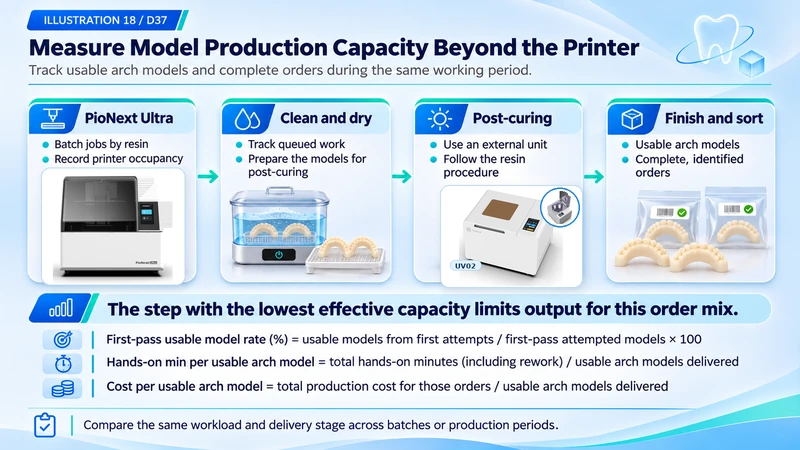
Measure Usable Model Output and Labor
Measure a batch after the models have completed the processing needed for the next task. An incomplete model, a damaged surface, or a model with an unreadable stage identifier adds work even if the printer reported a completed job.
|
Measure |
What to count |
What it reveals |
|
Usable arch models |
Models ready for the specified next task after processing |
The physical output the lab can supply |
|
Complete orders |
Orders with all required arch models and stages available |
Whether production meets the actual delivery request |
|
Printer occupancy |
Time the printer is committed to the job, including relevant setup |
The share of printing capacity consumed |
|
Hands-on labor |
Print preparation, part removal, cleaning, loading and unloading the curing unit, finishing, and sorting |
The labor needed to deliver that output |
|
Rework |
Reprints and any additional processing they require |
Labor and equipment time spent correcting an order |
First-pass usable model rate (%) = usable arch models from the first attempt ÷ arch models attempted in the first pass × 100. Count the models after the processing required for their next task. Keep subsequent remake attempts separate so they do not inflate the first-pass result.
Hands-on minutes per usable arch model = total hands-on minutes, including rework, ÷ usable arch models delivered for those orders. This measures labor per delivered model.
Cost per usable arch model = total production cost for those orders ÷ usable arch models delivered. Include materials, consumables, labor, and allocated equipment costs for the initial production and any reprints. Count each expense once, and compare the same model type at the same delivery stage.
Track printer occupancy separately from hands-on labor. A technician may prepare another job while a batch prints. Do not count unattended printing time as hands-on labor. Recording both shows whether a layout reduces printer occupancy, hands-on labor, or both.
Count each delivered model once. If an arch model must be reprinted, include the labor and cost of both attempts, but count the delivered model only once in the unit-cost calculation. Reprinting then increases the measured cost without inflating the output count.
Use a Production Trial to Establish Practical Capacity
Run the trial against actual orders over a defined work period. Include a paired study model set with an appointment deadline, a routine working model order if the lab provides that service, and a multi-stage order when it reflects the regular workload. Compare the proposed batch layout with the current process using equivalent model types, materials, and finish requirements. Record each order’s due date and which arch models are due together so the trial measures the work the lab has promised to deliver.
For each batch, record the resin profile and layout, printer occupancy, hands-on labor, and when the models are ready to move to the next station. Note where they wait and why. If the printer releases another build while models are still waiting for the external curing unit, test whether a change in batch release times can reduce that queue. If models finish on time and then sit unsorted, check how much technician time is spent matching case, arch, and stage IDs before adding another print run. Compare stations using usable arch models per working period and check that each queue can clear in time for the orders it serves.
Track reprints by cause. A damaged surface, an unreadable stage ID, and a model from an earlier design version require different corrections. In the 20-model example above, a series with one missing arch model remains incomplete when all 20 are due together. Record the extra labor and material for the reprint, along with the delay from the missing stage to the release of the complete order. This gives the lab a cost for the work it actually delivers and gives the clinic a more reliable basis for booking a visit or scheduling the next step.
For the purchasing decision, compare the cost per delivered arch model and the number of complete orders ready by their deadlines. Include room in the next schedule for the rework observed during the trial. If smaller batches keep appointment-driven orders on time, compare the extra setup labor with the delivery benefit. If post-processing regularly holds orders, use the observed queue time to decide whether to adjust staffing, reschedule batches, or add capacity at that station. The trial shows which change would help the lab finish more orders within its own production schedule.
Share your expected orthodontic model mix with our team. Include representative arch model designs, the number of stages per order, and the step where work tends to wait. We can discuss PioNext Ultra resin profiles and batch layouts for the work you need to deliver.